
Applies to: Player 5.4, 5.5, 5.6, 5.7 for ArcGIS Pro
When upgrading Player software any active Player projects should also be upgraded. An upgrade will modify the database to enable the latest functionality. Error messages may appear if the version of the software is out of sync with the database schema.
Upgrading an existing Player project
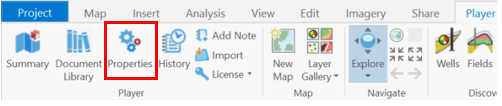
Open the project and from the Player ribbon select the Player Properties
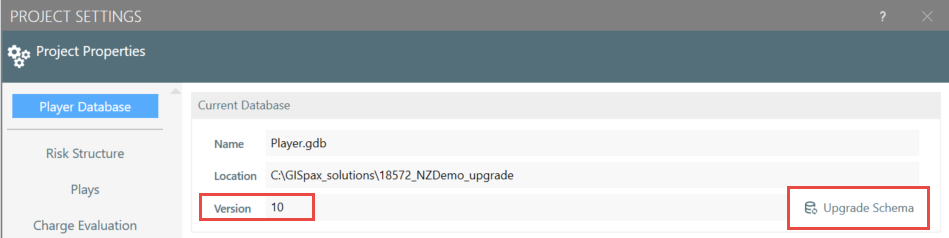
In the Player Database option the current database Version is shown. Select the Upgrade Schema button (note, exclusive access to the project is required to perform an upgrade).
The upgrade dialog will appear while the process runs. When the upgrade completes successfully the new database Version number will be displayed.
Upgrading an Enterprise database
Older versions of Player did not support upgrading projects hosted in an enterprise database. However, Player 5.6.1 and later versions include this capability. The process is the same as described above.
Upgrading Player 4 databases
Issues may be encountered when upgrading older Player projects if using pre-Player 5.7 software (Player 5.6.1 and earlier). Recommend updating Player software to 5.7, or contact support, if upgrading Player 4 projects.
The database version, when it is upgraded with the following Player software version, will be as follows:
| Player Software Version | Database Version |
| Player 4.4 SP1-5 | 4.4 |
| Player 4.5 | 4.5 |
| Player 4.5 SP1 | V4.5.1 geodatabase (4.5.1) |
| Player 4.5 SP2/3/4 | V4.5.1 geodatabase (4.5.2) |
| Player 5.1 | V4.5.1 geodatabase (4.5.2) |
| Player 5.2 | V5.2 geodatabase (5.2) |
| Player 5.3 | V5.3 geodatabase (5.3) |
| Player 5.4.x | 10 |
| Player 5.5.0 | 11 |
| Player 5.6.x | 12 |
| Player 5.7.x | 15 |
Note: the Database Version is stored as a value in the SystemSettings table in the Player.gdb, however, this setting did not exist with legacy databases. Instead Player used the existence/non-existence of tables/columns in the database to determine the version.
Related topics